

Change data capture (CDC)
Change data capture (CDC) turns every insert, update and delete in a database into a Kafka event. A connector such as Debezium reads the database’s log and writes one topic per table, and search indexes, caches, warehouses and other services keep their own copies up to date from those topics.
A copy is only as good as the way it applies changes. Connectors can deliver the same change twice, and a change can arrive after a newer one for the same row. A consumer that applies changes in arrival order rolls rows back without any error. Akema shows you the changes themselves, so you can see what your consumers are being asked to apply.
The example
Section titled “The example”An online store’s database streams five tables to Kafka, keyed by each row’s primary key. A stream processor also writes a derived topic.
| Topic | Key | Holds |
|---|---|---|
cdc.customers |
customer_id |
Customer rows: email, loyalty tier, marketing opt-in |
cdc.products |
sku |
Product rows: name, category, price, whether it’s on sale |
cdc.orders |
order_id |
Order rows: customer, total, status |
cdc.order_items |
order_item_id |
Order lines: order, SKU, quantity, unit price |
cdc.inventory_levels |
sku:warehouse_id |
Stock per warehouse: on hand and reserved |
derived.customer_activity |
customer_id |
Each customer’s last order and lifetime value, from a stream join |
Each change is a Debezium-style envelope. op says what happened: c (create), u (update) or d (delete). before and after hold the row on each side of the change, and version is the change’s position in the table’s log, which only ever goes up:
{ "op": "u", "ts_ms": 1792949758726, "tx_id": "3b78ac4b326643ba", "table": "products", "source": { "connector": "mysql", "db": "shop", "change_seq": 1 }, "before": { "sku": "NW-BEA-0016", "price_cents": 7360, "active": true }, "after": { "sku": "NW-BEA-0016", "price_cents": 7849, "active": false }, "version": 1}Changes made in one database transaction share a tx_id. Now and then the connector delivers a change again, with an older timestamp, which is what happens when a connector restarts and re-reads part of the log.
1. Connect
Section titled “1. Connect”On Connect, add a source for your cluster with the CDC topics. CDC topics are often compacted and can hold years of history, so use Start mode Latest (tail) to watch changes as they happen, or Timestamp to look at a particular deploy or migration. See Connect to Kafka.
Topics like cdc.customers are read in full by every new consumer, so they’re worth checking before you point a new service at them.
2. Trap the changes that matter
Section titled “2. Trap the changes that matter”CEL can compare before and after in one expression, so a trap can catch a change by what it changed, not just what the row looks like now. Add these traps:
| Trap | Expression | Catches |
|---|---|---|
deletes |
value_json.op == "d" |
Deleted rows, on any table |
price_jump |
topic == "cdc.products" && value_json.op == "u" && value_json.after.price_cents > value_json.before.price_cents * 1.1 |
Price rises of more than 10% in one change |
product_pulled |
topic == "cdc.products" && value_json.op == "u" && value_json.before.active && !value_json.after.active |
Products taken off sale |
oversold |
topic == "cdc.inventory_levels" && value_json.after.on_hand < value_json.after.reserved |
Stock where more is promised to orders than is on the shelf |
In a minute of changes, about 3,300 messages, Akema caught 79 deletes, 17 price jumps, 16 products taken off sale and 18 oversold stock levels.
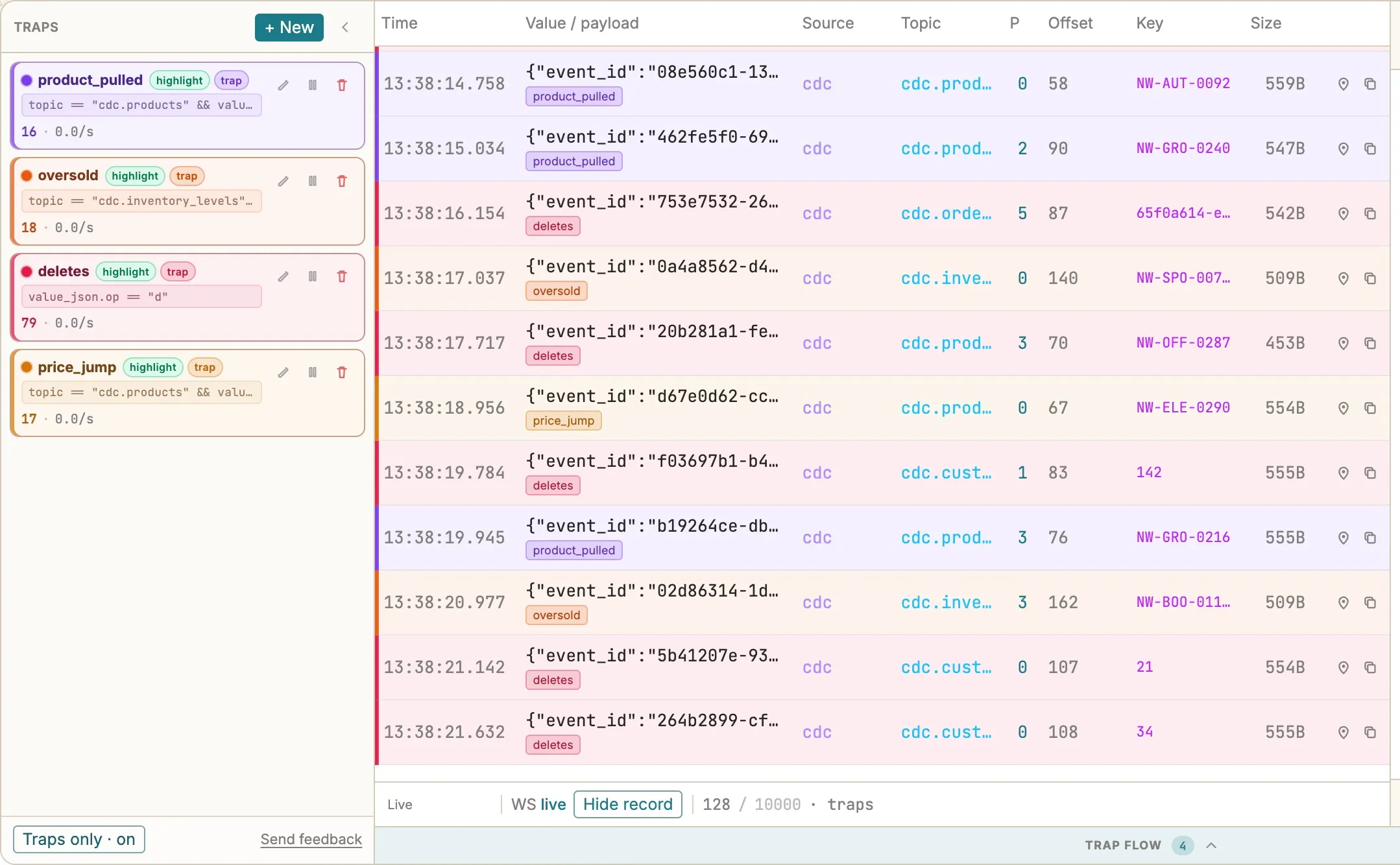
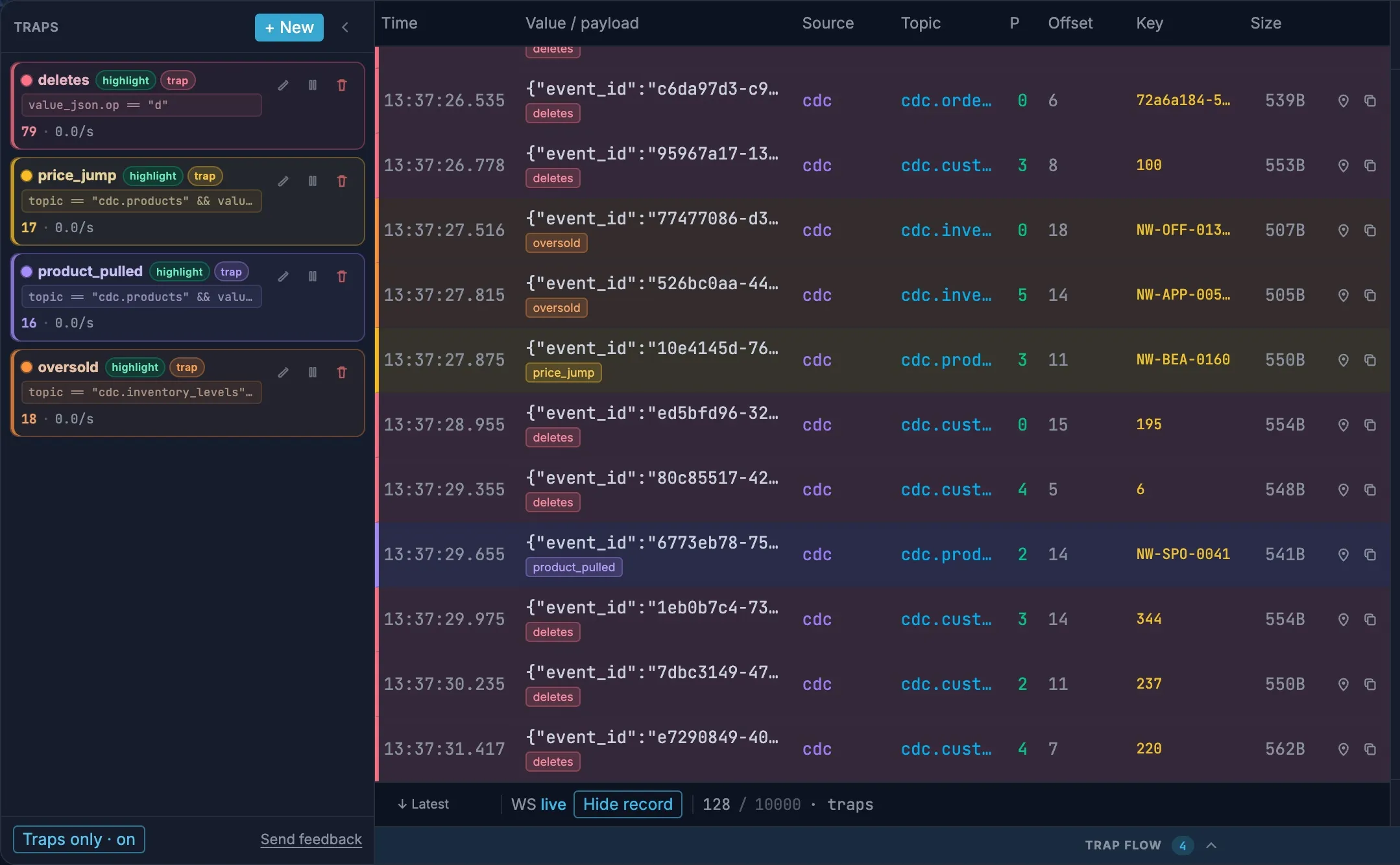
A delete has no after, so open the row and look at before to see what was removed. To follow one row’s history, copy its key and add a trap on key == "…".
3. See what’s changing
Section titled “3. See what’s changing”A change stream is hard to read row by row. Explore shows which tables are busy, what kind of changes each one makes, and when. Choose Load to start.
Click through to the changes
Section titled “Click through to the changes”- Drag
topicfrom Envelope onto the canvas to see which tables change most. - Drag
opfromcdc.customersonto the canvas to see that table’s mix of creates, updates and deletes. - Click
d, then dragbefore.loyalty_tiernext to it to see which kinds of customers were deleted. A delete has noafter, so its fields are underbefore.
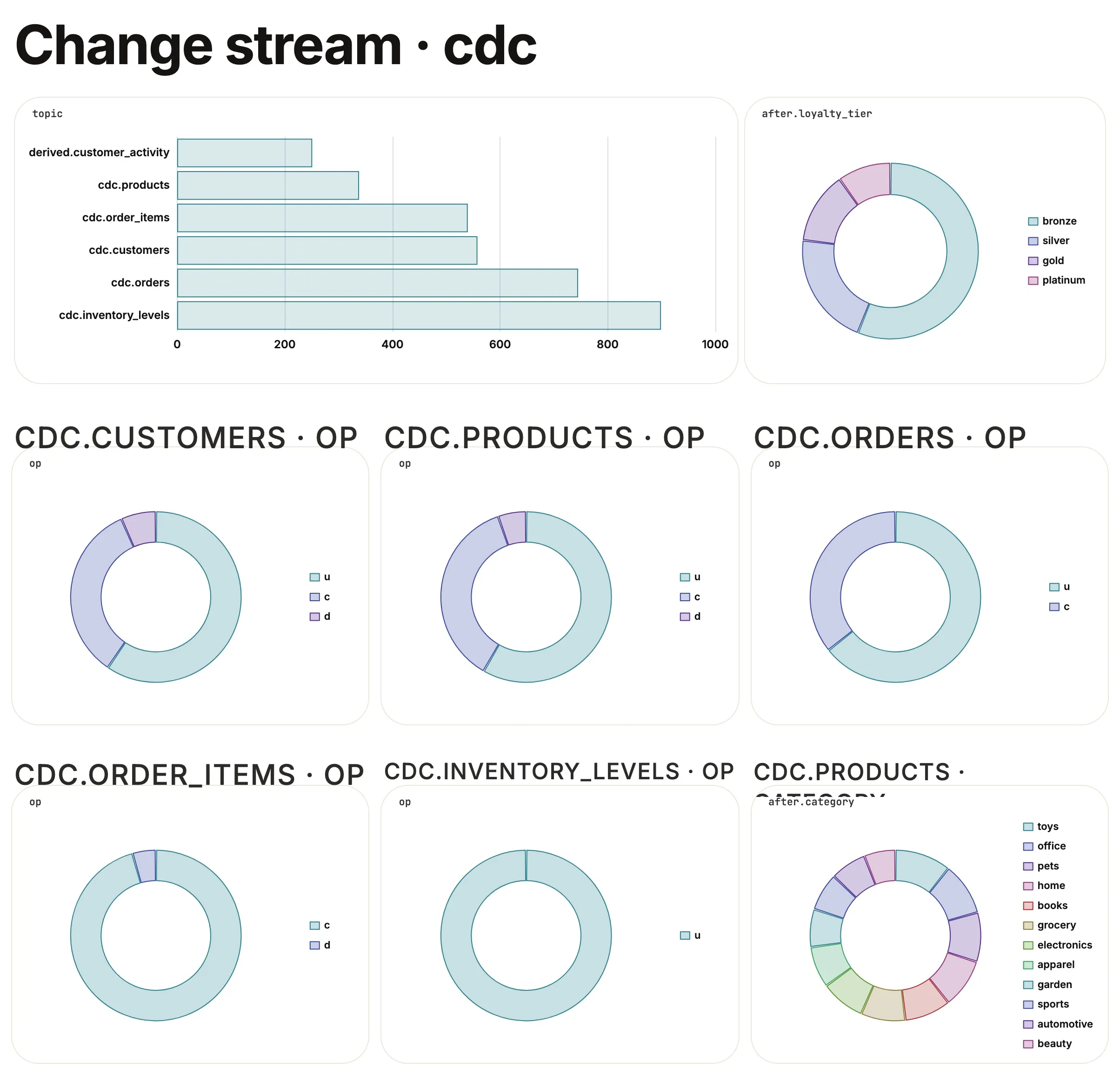
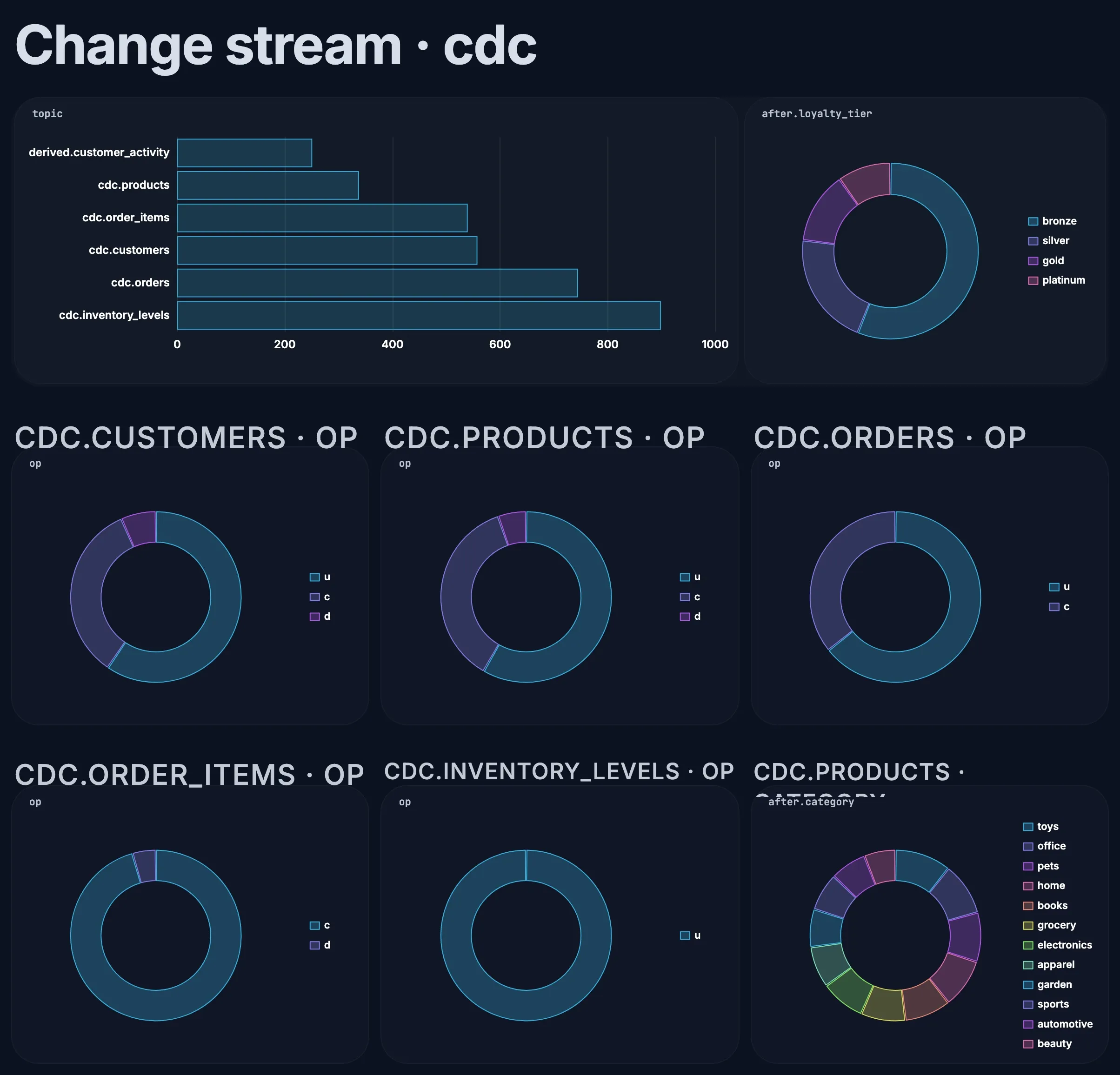
In the example, inventory changed most, with 899 changes in the minute. A burst of deletes from a table that rarely deletes is worth a look before it reaches your copies.
Compare the tables’ habits
Section titled “Compare the tables’ habits”Every table changes in its own way, and a chart of op for each one makes the habits visible. Drag op from each CDC topic onto the canvas, choose Donut for each, then select them all and choose Group to put them side by side in one container.
In the example, the donuts show five different shapes:
| Table | Changes |
|---|---|
cdc.inventory_levels |
Updates only: stock rows are created once and then adjusted |
cdc.orders |
Creates and updates, never deletes: orders change status but are kept |
cdc.order_items |
Creates and deletes: lines are added and removed, not edited |
cdc.customers, cdc.products |
All three, mostly updates |
Once you know a table’s shape, a change to it stands out: a delete slice appearing on cdc.orders, or creates on cdc.inventory_levels, means the application or the connector is doing something new.
See when changes happen
Section titled “See when changes happen”Click d on the cdc.customers donut, then drag time from Envelope onto the canvas. You get a line of customer deletes per second, or per minute over a longer window. A steady trickle is customers closing accounts; a block of deletes in a few seconds is a job, a migration or a mistake, and the time tells you which deploy or run to look at.
Build a change-stream board
Section titled “Build a change-stream board”| Card | How to make it |
|---|---|
| Changes by table | topic from Envelope, as a Horizontal bar |
| Operations | One op Donut per table. Every card is titled op, so add a small text block above each with the table’s name |
| Customers | after.loyalty_tier from cdc.customers |
| Products | after.category from cdc.products |
Charts of Envelope fields follow every filter, so clicking d on the customers donut narrows Changes by table to customer deletes too. Click it again to go back to every change. Turn on Live while a migration or backfill runs, and use Present to share it with the team watching the release. See Explore and charts.
The Fields palette lists before.email and after.email separately. In SQL views, though, a field name that appears in both gets a plain column for one and a prefixed column for the other, so it’s clearest to read row values straight from the message, as the queries below do.
4. Check the change stream with a playbook
Section titled “4. Check the change stream with a playbook”In Explore, choose Playbook, add a playbook, and add these queries with + SQL. They read the messages table and the per-topic views, such as v_cdc_orders; payload->>'$.after.status' reads a field from the message.
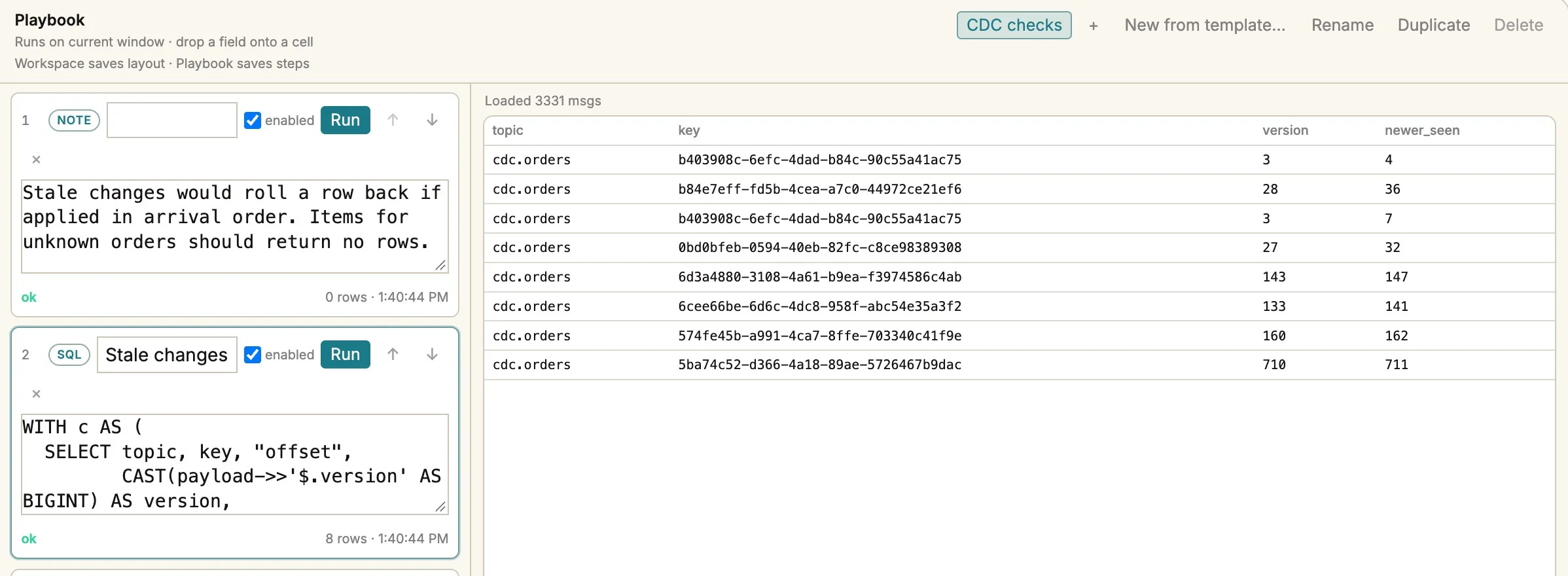
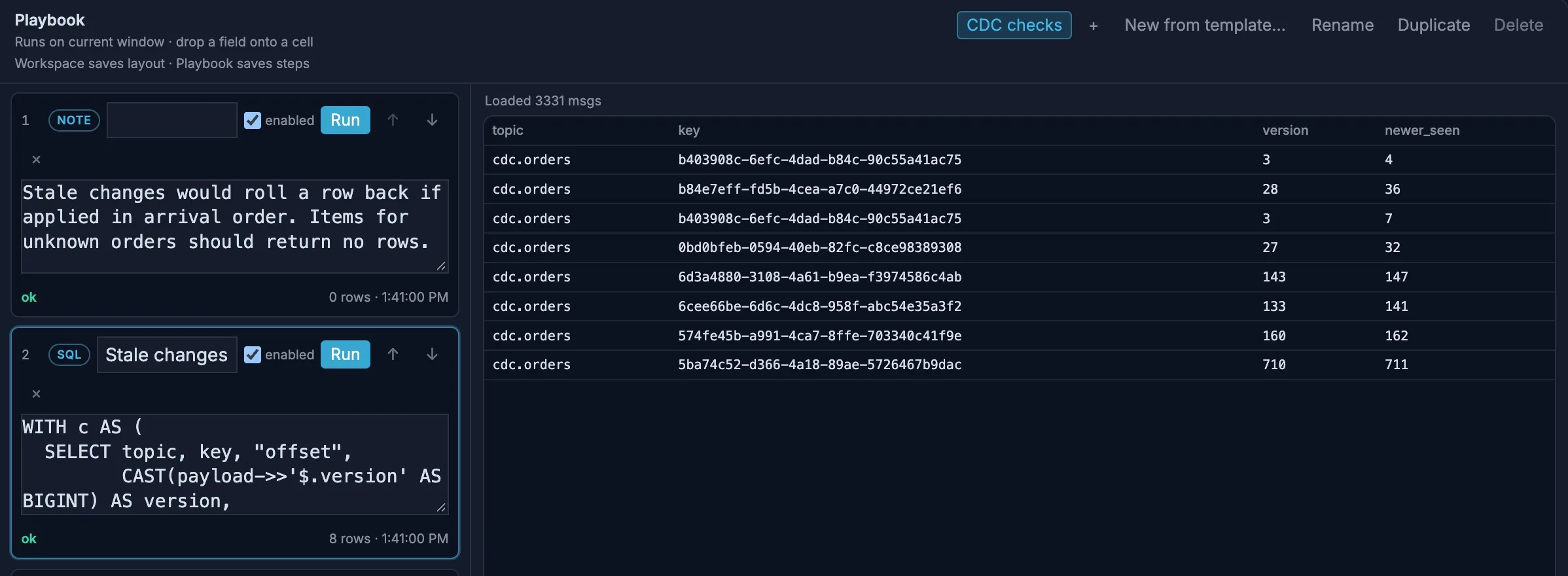
Stale changes: changes that arrived after a newer version of the same row. Applied in arrival order, each would roll its row back.
WITH c AS ( SELECT topic, key, "offset", CAST(payload->>'$.version' AS BIGINT) AS version, max(CAST(payload->>'$.version' AS BIGINT)) OVER ( PARTITION BY topic, key ORDER BY partition, "offset" ROWS BETWEEN UNBOUNDED PRECEDING AND 1 PRECEDING) AS newer_seen FROM messages WHERE topic LIKE 'cdc.%')SELECT topic, key, version, newer_seenFROM cWHERE version < newer_seenORDER BY topic, "offset"Replayed changes: rows that received the same version more than once.
SELECT topic, COUNT(*) AS replayed_rowsFROM ( SELECT topic, key, payload->>'$.version' AS version FROM messages WHERE topic LIKE 'cdc.%' GROUP BY ALL HAVING COUNT(*) > 1)GROUP BY 1ORDER BY 2 DESCItems for unknown orders: every new order line should belong to an order in the stream.
SELECT i.key AS order_item_id, (i.payload->>'$.after.order_id') AS order_idFROM v_cdc_order_items iWHERE (i.payload->>'$.op') = 'c' AND NOT EXISTS ( SELECT 1 FROM v_cdc_orders o WHERE o.key = (i.payload->>'$.after.order_id'))Change mix: creates, updates and deletes per table.
SELECT topic, payload->>'$.op' AS op, COUNT(*) AS changesFROM messagesWHERE topic LIKE 'cdc.%'GROUP BY ALLORDER BY 1, 2Current products: the latest version of each product, the way a compacted topic or a correct consumer sees it. The highest version wins, whatever order the changes arrived in, and deleted products drop out.
SELECT key AS sku, max(version) AS version, arg_max(CAST(payload->>'$.after.price_cents' AS BIGINT), version) AS price_cents, arg_max(CAST(payload->>'$.after.active' AS BOOLEAN), version) AS activeFROM v_cdc_productsGROUP BY keyHAVING arg_max(op, version) <> 'd'ORDER BY skuChoose Run all. Items for unknown orders returned no rows, and Change mix showed deletes on customers (37), order lines (24) and products (18), matching the deletes trap’s 79. Replayed changes found 114 rows that got the same change twice or more, on every table. Replays are harmless to a consumer that compares versions, and a sign of trouble for one that doesn’t.
Stale changes found 8, all on cdc.orders, where rows change most. In one, an order that had reached shipped at version 141 then received a copy of version 133, when it was still placed. A consumer applying changes in arrival order would show that shipped order as just placed again.
Current products listed 213 products on the current version of each, the result a correct consumer should end up with.
Keep personal data out of view
Section titled “Keep personal data out of view”Customer changes carry emails and names in both before and after, and derived.customer_activity repeats the email. Add a PII redaction profile to cdc.customers and derived.customer_activity that covers before.email and after.email (and the name fields). The tokens are consistent, so the same email gets the same token on both sides of a change and across topics.
Next steps
Section titled “Next steps”- Check a consumer’s copy: run Current products and compare it with the table your service built from the same topic.
- Look at a migration or backfill: start a source at a Timestamp with a Stop time around it, and watch the
deletesandprice_jumpcounters. See Choose where to start reading. - Group a transaction’s changes: in SQL,
GROUP BY payload->>'$.tx_id'shows which rows changed together.